Understanding canvas sizing is crucial for optimal results, whether for digital art, printing, or apparel. Proper dimensions and resolution ensure clarity and quality.
What is Canvas and Why is Sizing Important?
In digital art, a canvas is a rectangular area representing the surface for creating images. It’s defined by width and height, measured in pixels. For physical mediums, canvas refers to the fabric stretched over a frame, used for painting. Sizing is paramount because it directly impacts image quality and usability.
Incorrect sizing leads to pixelation when enlarged or blurring when reduced. For printing, accurate dimensions ensure the final product matches the intended design. In apparel, like Bella + Canvas t-shirts, proper sizing guarantees a good fit and print quality. API integrations also require careful consideration of data sizing for efficient performance.

Understanding Resolution and DPI
Resolution, measured in pixels, defines the detail level of an image on a canvas. DPI (dots per inch) is crucial for print quality, indicating how many ink dots are packed into each inch. Higher DPI means sharper prints, typically 300 DPI for professional results.
For web use, 72 DPI is often sufficient, as images are viewed on screens with lower resolutions. A larger canvas with higher resolution allows for greater detail and flexibility in editing. Conversely, a small canvas with low resolution will appear pixelated when enlarged. Understanding this relationship is key to achieving desired outcomes, whether digital or printed.
Standard Canvas Sizes for Common Applications
Various applications demand specific canvas sizes; social media, printing, and apparel each have preferred dimensions for optimal visual presentation and quality.
Social Media Canvas Sizes
Optimizing images for social media requires understanding platform-specific canvas size recommendations. Instagram thrives on square formats – consider 1080×1080 pixels for standard posts, or 1080×1350 for portrait orientations. Stories benefit from a 1080×1920 pixel canvas. Facebook’s ideal dimensions vary; a link preview typically uses 1200×630 pixels, while cover photos require 820×312 pixels.
Twitter prefers a 1600×900 pixel canvas for header images, and in-feed images should ideally be 1200×675 pixels. Ignoring these guidelines can lead to cropping or pixelation, diminishing visual impact. Consistent adherence to these standards ensures your content appears professional and engaging across all platforms.
Instagram Canvas Sizes
Instagram’s visual nature demands precise canvas sizing for optimal display. Standard feed posts perform best at 1080×1080 pixels, maintaining a square aspect ratio. For portrait-oriented images, a 1080×1350 pixel canvas is recommended, maximizing vertical space. Instagram Stories require a 1080×1920 pixel canvas, ensuring full-screen visibility on mobile devices.
Reels also utilize the 1080×1920 pixel dimension. IGTV videos benefit from a 1080×1920 canvas as well. Utilizing these specific dimensions prevents unwanted cropping and ensures your content appears crisp and professional, enhancing user engagement and overall aesthetic appeal within the Instagram ecosystem.
Facebook Canvas Sizes
Facebook’s diverse content formats necessitate varied canvas sizes. For standard image posts, a recommended size is 1200×630 pixels, ensuring optimal display in newsfeeds. Link previews benefit from a 1200×628 pixel canvas, grabbing user attention. Facebook Stories, mirroring Instagram, utilize a 1080×1920 pixel canvas for full-screen viewing.
Event cover photos require a 1920×1080 pixel canvas. Profile pictures are best at 170×170 pixels. Ad creatives have specific requirements depending on placement; however, 1200×628 is a common starting point. Adhering to these dimensions guarantees a polished presentation and avoids distortion, maximizing impact on the Facebook platform.
Twitter Canvas Sizes
Twitter’s visual guidelines prioritize concise and impactful imagery. For in-stream photo posts, a recommended canvas size is 1600×900 pixels, ensuring high resolution while optimizing loading speed. The ideal aspect ratio is 16:9. Header images benefit from a canvas size of 1500×500 pixels, providing a visually appealing banner across user profiles.
Twitter Cards, used for sharing links with rich media, require specific dimensions depending on the card type. However, a general guideline is 800×418 pixels. Ad images also adhere to similar specifications. Maintaining these dimensions prevents cropping and ensures your visuals are displayed correctly, enhancing engagement on the platform.
Printing Canvas Sizes
Selecting the right canvas size for printing depends heavily on the desired impact and viewing distance. Small prints, up to 8×10 inches, are ideal for desk displays or smaller wall spaces, offering affordability and simplicity. Medium prints, ranging from 8×12 to 16×20 inches, strike a balance between visibility and cost, suitable for living rooms or bedrooms.
For a statement piece, large prints – 20×30 inches and larger – command attention and are best for spacious areas; Remember to consider DPI (dots per inch); 300 DPI is standard for high-quality prints. Accurate sizing ensures your artwork translates beautifully from digital to physical form, preserving detail and vibrancy.
Small Prints (Up to 8×10 inches)
Small canvas prints, typically up to 8×10 inches, are exceptionally versatile and cost-effective. They’re perfect for creating gallery walls with multiple pieces, adding a personal touch to smaller spaces like offices or bedrooms, or gifting personalized artwork. These sizes require a higher resolution image to maintain clarity upon printing, ideally around 300 DPI.
Consider using these dimensions for portraits, landscapes, or abstract art that doesn’t demand a large format to convey its impact. They’re also excellent for testing print quality before committing to larger, more expensive canvases. Framing options are abundant and affordable for this size range.
Medium Prints (8×12 to 16×20 inches)
Medium-sized canvas prints, ranging from 8×12 to 16×20 inches, strike a balance between visual impact and affordability. These dimensions are ideal for showcasing artwork in living rooms, dining areas, or larger bedrooms, becoming focal points without overwhelming the space. A resolution of 300 DPI remains crucial for sharp, detailed prints.
This size range is well-suited for a variety of subjects, including detailed landscapes, portraits with expressive features, or artwork with intricate patterns. Framing options are diverse, allowing for customization to match any décor. They offer a substantial presence while remaining manageable in terms of cost and wall space.
Large Prints (20×30 inches and larger)
Large canvas prints, beginning at 20×30 inches and extending upwards, command attention and create a dramatic statement in any room. These sizes are best suited for spacious areas like grand living rooms, lobbies, or expansive hallways, serving as dominant visual anchors. A minimum resolution of 300 DPI is absolutely essential to maintain image clarity at this scale.
Consider bold, impactful artwork for larger prints – abstract compositions, sweeping landscapes, or powerful portraits. Professional stretching and framing are highly recommended to ensure the canvas remains taut and the artwork is presented flawlessly. These prints represent a significant investment, demanding high-quality materials and execution.
Canvas Sizing for Different Materials
Sizing varies significantly based on the material – from apparel like Bella + Canvas tees to traditional stretched canvas for painting, impacting design needs.
Bella + Canvas T-Shirt Sizing
Bella + Canvas offers a diverse range of t-shirt styles, each with unique sizing specifications. Accurate measurements are vital for achieving the desired fit and print placement. Consider youth versus adult sizes, as dimensions differ considerably. Mockup charts, like those available for the 3001Y youth tee, are invaluable for visualizing the final product.
When selecting a size, refer to the official Bella + Canvas size charts, paying close attention to chest width, length, and sleeve length. Remember that shrinkage can occur after washing, so factoring this into your size selection is prudent. Proper sizing ensures customer satisfaction and minimizes returns, especially when dealing with custom prints.
Canvas Fabric for Painting
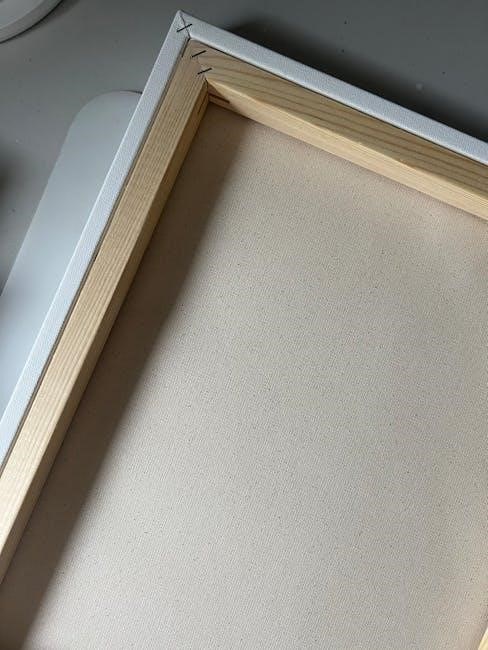
Selecting the appropriate canvas size for painting depends on the artwork’s scale and desired aesthetic. Stretched canvases come in standard sizes, from small, easily manageable options to large, statement-making pieces. Canvas board sizes offer a more economical alternative, ideal for practice or smaller works.
Consider the aspect ratio when choosing dimensions; a square canvas differs significantly from a rectangular one. Remember that the finished painting will include the canvas edges, so account for any desired border or wrapping. Always verify the canvas’s weight and texture, as these factors influence paint adhesion and overall artwork presentation; Ensure the canvas is properly primed for optimal results.
Stretched Canvas Sizes
Stretched canvases are readily available in a vast array of standard sizes, catering to diverse artistic needs. Common dimensions include 8×10, 9×12, 12×16, 16×20, 18×24, and 24×36 inches. Larger sizes, such as 30×40 or even custom dimensions, are also obtainable, though often at a higher cost.
The depth of the canvas (profile) also varies, typically ranging from 3/4 inch to 1.5 inches. Deeper profiles offer greater stability and a more substantial appearance. When selecting a stretched canvas, consider the artwork’s subject matter and the desired visual impact. Smaller sizes suit intimate studies, while larger canvases accommodate grand, expansive compositions.
Canvas Board Sizes
Canvas boards present a cost-effective alternative to stretched canvases, ideal for practice, studies, or smaller artworks. They typically consist of a canvas surface adhered to a rigid cardboard or fiberboard backing. Standard sizes mirror those of stretched canvases, including 8×10, 9×12, 12×16, and larger options up to 24×30 inches.
Boards are generally thinner than stretched canvases, making them suitable for framing or display with a mat. They are particularly popular among students and artists experimenting with different techniques. While less durable than stretched canvases, boards offer a convenient and affordable surface for exploring creativity.

Custom Canvas Sizing
Tailoring canvas dimensions to specific needs allows for unique artistic visions. Calculations and online tools simplify determining ideal sizes for any project.
Calculating Custom Canvas Dimensions
Determining custom canvas dimensions requires careful consideration of the intended use and desired outcome. Start by defining the final printed or displayed size. For digital projects, consider the screen resolution and viewing distance. When calculating for printing, factor in the desired DPI (dots per inch) – 300 DPI is standard for high-quality prints, while 72 DPI is sufficient for web display.
To calculate the pixel dimensions, multiply the desired width and height in inches by the DPI. For example, an 8×10 inch print at 300 DPI would require a canvas size of 2400×3000 pixels. Always add a bleed area (typically 0.125 inches on each side) to prevent white edges during printing. Remember to maintain the aspect ratio to avoid distortion.
Using Online Canvas Size Calculators
Fortunately, numerous online canvas size calculators simplify the process of determining optimal dimensions. These tools typically require you to input the desired width, height, and DPI, and they automatically calculate the corresponding pixel dimensions. Some calculators also allow you to specify the intended use (e.g., social media, printing) and suggest appropriate sizes.
Popular options include calculators offered by design websites and printing services. Utilizing these resources eliminates manual calculations and reduces the risk of errors. Always double-check the results to ensure they align with your project requirements. Remember to consider bleed areas and aspect ratios when using these tools for print projects, guaranteeing professional-looking results.
Canvas Credentials & Badges Sizing/Integration
Canvas Credentials has rebranded as Parchment Award Digital Badges, offering automated badge awarding upon module completion, even without a Canvas Credentials license.
Canvas Credentials Rebranding to Parchment Award Digital Badges
Instructure is unifying its credentialing ecosystem under the Parchment brand, resulting in Canvas Credentials being rebranded as Parchment Award Digital Badges. This strategic shift aims to streamline the digital credentialing process for institutions and learners alike. The rebranding doesn’t fundamentally alter the functionality of awarding badges within Canvas; it simply places them within a broader, more integrated platform.
This update provides a more cohesive experience for managing and sharing digital credentials. Institutions can now leverage Parchment’s established network and tools alongside Canvas’s learning management capabilities. The transition is designed to be seamless, ensuring minimal disruption to existing workflows for both administrators and students. This alignment strengthens the overall value proposition of digital credentials issued through Canvas.
Using Canvas Badges Without a License
Fortunately, Canvas Badges can indeed be utilized effectively without requiring a dedicated Canvas Credentials license. This flexibility allows educators to implement badge systems for recognizing student achievements and motivating engagement, even with limited institutional resources. Institutions can automatically award badges when students successfully complete modules containing specific activities.
This functionality is particularly beneficial for pilot programs or smaller-scale badge implementations. While a Canvas Credentials license unlocks advanced features like a public badge display and centralized management, the core badge awarding process remains accessible to all Canvas users. This accessibility promotes innovation and experimentation with digital credentialing within the learning environment.

Canvas API and Development Sizing Considerations
API automation benefits from admin tokens with “become other users” permissions, streamlining workflows. RSS feed integration requires careful data sizing for optimal performance.
Admin Token Permissions for API Automation
Leveraging the Canvas API for automation is significantly enhanced by utilizing admin tokens. Specifically, obtaining an admin token with the “become other users” permission unlocks powerful capabilities. This permission allows the API to act on behalf of different users within the Canvas instance, automating tasks that would otherwise require manual intervention for each individual account.
This is particularly useful for bulk operations, such as course creation, user enrollment, or grade synchronization. By streamlining these processes, developers can create more efficient and scalable solutions. Careful consideration of scope and security is vital when implementing such permissions, ensuring only necessary access is granted to the token.
RSS Feed Integration and Data Sizing
The Instructure Community provides RSS feeds for convenient access to updates and information. When integrating these feeds, data sizing considerations are minimal, as RSS primarily delivers metadata – titles, links, and brief descriptions – rather than large content payloads. However, applications consuming the feed should be prepared to handle varying lengths of these elements.
Efficient parsing and storage of RSS data are key to maintaining performance. While individual item sizes are typically small, a high volume of updates could necessitate optimized data handling. Developers should focus on efficient data retrieval and caching strategies to ensure a responsive user experience when utilizing these RSS feeds.
Troubleshooting Canvas Sizing Issues
Address pixelation by increasing resolution; ensure accurate prints by verifying dimensions before finalizing. Careful attention to detail prevents common sizing frustrations.
Dealing with Pixelation and Blurring
Pixelation and blurring often stem from insufficient resolution for the intended canvas size. When enlarging an image, pixels stretch, becoming visibly distinct – this is pixelation. To combat this, always start with a high-resolution source image. Before resizing, consider the final output; printing demands significantly higher DPI (dots per inch) than on-screen display.
Increasing the canvas size without increasing resolution simply exacerbates the problem. Utilize image editing software to resample the image, intelligently adding pixels. However, be aware that resampling can introduce artifacts. A general rule is to avoid excessive enlargement. If blurring occurs, sharpening filters can help, but overuse can create unwanted noise. Regularly preview your canvas at 100% zoom to assess clarity.
Ensuring Accurate Print Sizes
Achieving accurate print sizes requires meticulous attention to detail, starting with DPI. For high-quality prints, aim for 300 DPI; lower resolutions may result in a pixelated appearance. Verify your canvas dimensions in pixels correspond to your desired print size at the chosen DPI. Most printing services provide templates or calculators to assist with this conversion.
Always include a bleed area – an extra margin extending beyond the trim line – to prevent white edges. Account for potential shrinkage during the printing process, especially with canvas fabric. Proof your design at actual size before submitting it to the printer. Consider ordering a test print to confirm colors and dimensions before a large production run.